UE动画模块浅析
UE动画常用操作
Section titled “UE动画常用操作”动画融合方式
Section titled “动画融合方式”传统动画融合
Section titled “传统动画融合”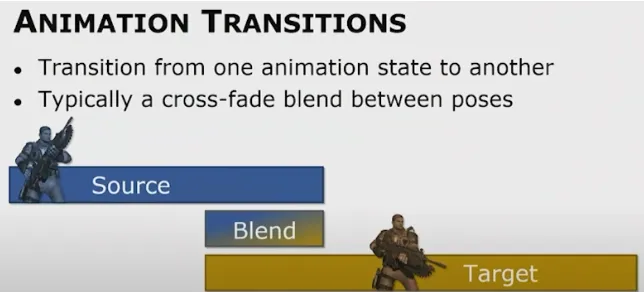
Blend那一段需要计算两端动画以及他们的混合,相当于双倍的动画开销
惯性融合Inertialization
Section titled “惯性融合Inertialization”- 现实里不会混合(挥手后放下,而不会边挥手边放下)
- 不进行blend,而是后处理解决不连续性

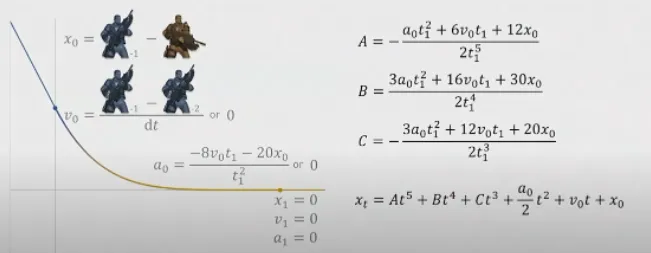
下面的曲线,是sequence1 - sequence2, 要做的工作是把他们的差值缓慢消除
插值成关于t的五次函数,参数由fade-off时间、两端序列首位的位置差和速度差 控制
Additive动画
Section titled “Additive动画”用来对Base Pose叠加一些额外的效果,比如运动状态受击的轻微反馈、瞄准状态开枪后的后坐力效果。
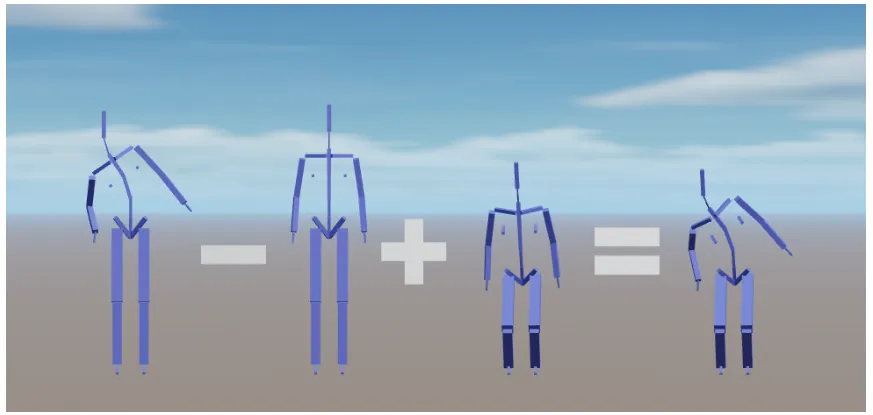 设Base Pose的Transform矩阵为B(所有joint),Reference Pose为R,Additive Pose(这里指被减数那个Pose)为A,那么Final Pose
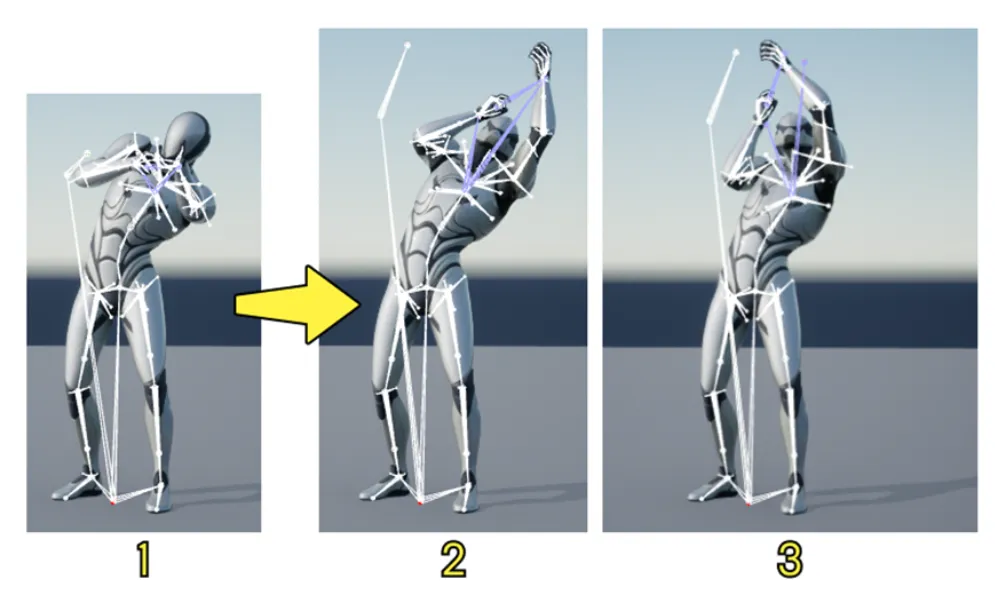
下图1为BasePose,Addtive Pose为向上瞄准,图2采用Local Space Additive,把Addtive Pose基于父骨骼的Transform叠加到Base Pose的父骨骼上,会导致瞄准歪掉,不再是预期的正上方。而图3采用Mesh Space Additive,把Addtive Pose基于root的Transform叠加到父骨骼上,这里会进行一次坐标系转换:Transform矩阵从Mesh Space => Local Space,因此开销比较大。
在UE中的实现如下
// FAnimationRuntime::AccumulateLocalSpaceAdditivePoseInternal// 这里的RTS都是BasePose的成员变量Rotation = VectorQuaternionMultiply2(BlendedRotation, Rotation);Translation = VectorMultiplyAdd(Atom.Translation, BlendWeight, Translation);Scale3D = VectorMultiply(Scale3D, VectorMultiplyAdd(Atom.Scale3D, BlendWeight, DefaultScale));Mesh Space的话会有额外两步
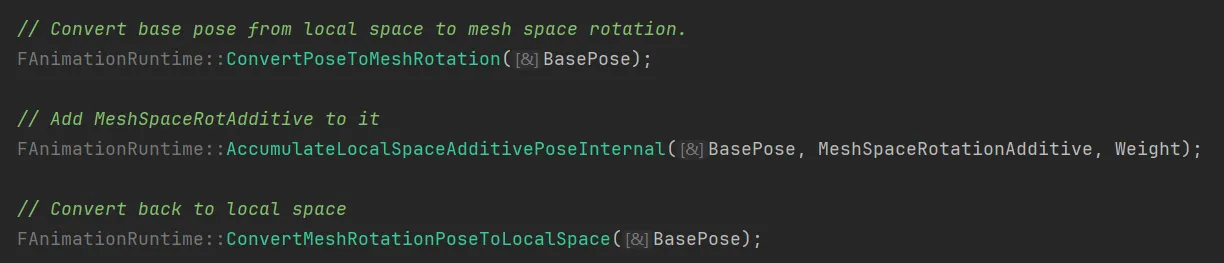 这里可以看出Mesh Space就是Root的Space,对于一条骨骼链,local space的rotation分别为R0,R1,R2, 那么Orientation2 = R0 * R1 * R2(想象机械臂从末端向root依次旋转)
for (FCompactPoseBoneIndex BoneIndex(1); BoneIndex < LocalPose.GetNumBones(); ++BoneIndex){    const FCompactPoseBoneIndex ParentIndex = LocalPose.GetParentBoneIndex(BoneIndex);
const FQuat MeshSpaceRotation = LocalPose[ParentIndex].GetRotation() * LocalPose[BoneIndex].GetRotation(); LocalPose[BoneIndex].SetRotation(MeshSpaceRotation);}这里注意,ue的FMatrix是row-matrix需要右乘,但TQuat是左乘。
Animation Montage
Section titled “Animation Montage”用来把多个AnimSequence合在一起根据game逻辑按任意顺序进行播放,一些基本的概念:
- Section: 把时间轴分为多个section,每个section可以放一段Sequence,可以根据逻辑切换播放每一段section,也可以设置section之间的混入
- Slot/Slot Group: Slot可以覆盖一个mesh或一个子mesh(比如FullBody/UpperBody),Slot在蒙太奇内设置,可以包含一些AnimSequence,设置好slot后就可以在ABP中使用,如下图,Slot节点在触发播放前会使用Source,比如Locomotion,而在触发后(比如角色按特定键)会override source动画。
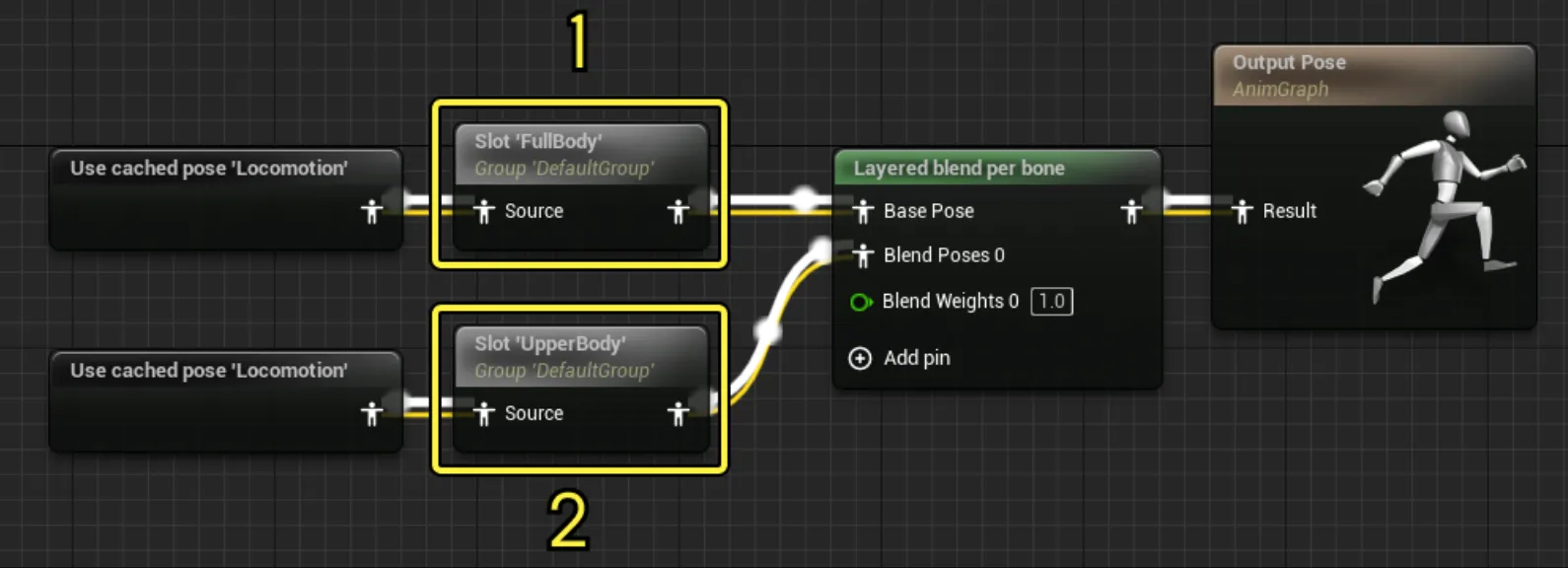 上图中,FullBody slot可以进行表情,而UpperBody可以放手部动画比如换弹。
Sequence A的Skeleton是S1, 把Sequence A应用到Skeleton S2上,要解决两点:
- 建立骨骼对应关系:骨骼名称不同 / 骨骼数量不同 / 骨骼长度不同
- S1的初始Pose和S2的初始Pose可能不同(比如一个A-Pose 另一个T-Pose),因此某一帧动画,调整到同一Pose所需要的transform是不同的。
classDiagram UObject o-- UAnimationAsset
UAnimationAsset o--  UAnimationSequeceBase
UAnimationAsset   o-- UBlendSpaceBaseUAnimationAsset : USkeleton *
 UAnimationSequeceBase o--  UAnimCompositeBaseUAnimationSequeceBase  o-- UAnimSequence
UAnimCompositeBase o-- UAnimCompositeUAnimCompositeBase o-- UAnimMontageFBX导入后一般会出现这几个资产
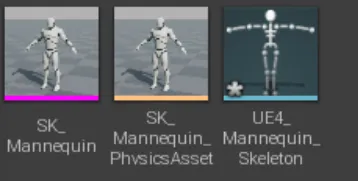
接下来的解析通过UFbxFactory::FactoryCreateFile来断点调试
USkeletalMesh* BaseSkeletalMesh = nullptr;BaseSkeletalMesh = FbxImporter->ImportSkeletalMesh( ImportSkeletalMeshArgs );USkeletalMesh* UnFbx::FFbxImporter::ImportSkeletalMesh(FImportSkeletalMeshArgs &ImportSkeletalMeshArgs){ // 导入的fbx中的所有数据 FSkeletalMeshImportData* SkelMeshImportDataPtr = nullptr; FillSkeletalMeshImportData(SkelMeshImportDataPtr, ...);
// 最终要输出的skeletalmesh USkeletalMesh* SkeletalMesh = nullptr;
// 写入USkeletalMesh的RefSkeleton成员 SkeletalMeshImportUtils::ProcessImportMeshSkeleton( SkeletalMesh->GetRefSkeleton(),*SkelMeshImportDataPtr, ...);
// 写入LOD蒙皮数据 FSkeletalMeshBuildParameters SkeletalMeshBuildParameters(SkeletalMesh, GetTargetPlatformManagerRef().GetRunningTargetPlatform(), ImportLODModelIndex, bRegenDepLODs); bBuildSuccess = MeshBuilderModule.BuildSkeletalMesh(SkeletalMeshBuildParameters);
}写入USkeletalMesh的RefSkeleton
TArray <SkeletalMeshImportData::FBone>&  RefBonesBinary = ImportData.RefBonesBinary;RefSkeleton.Empty();
// 用FReferenceSkeletonModifier对RefSkeleton作出修改FReferenceSkeletonModifier RefSkelModifier(RefSkeleton, SkeletonAsset);for (int32 b = 0; b < RefBonesBinary.Num(); b++){    const SkeletalMeshImportData::FBone & BinaryBone = RefBonesBinary[b];    const FString BoneName = FSkeletalMeshImportData::FixupBoneName(BinaryBone.Name);    // 骨骼结构,静态存储的树以及对应的transform    const FMeshBoneInfo BoneInfo(FName(*BoneName, FNAME_Add), BinaryBone.Name, BinaryBone.ParentIndex);    const FTransform BoneTransform(BinaryBone.BonePos.Transform);
    RefSkelModifier.Add(BoneInfo, BoneTransform);}
写入LOD蒙皮数据
// 把LOD Mesh数据存入 USkeletalMesh.ImportedModel;FSkeletalMeshLODModel& BuildLODModel = SkeletalMesh->GetImportedModel()->LODModels[LODIndex];MeshUtilities.BuildSkeletalMesh( BuildLODModel, SkeletalMesh->GetPathName(), RefSkeleton, LODInfluences, LODWedges, LODFaces, LODPoints, LODPointToRawMap, Options );USkeleton
Section titled “USkeleton”USkeleton是UAnimationAsset的成员
class USkeleton{private:
UPROPERTY(VisibleAnywhere, Category=Skeleton)TArray<struct FBoneNode> BoneTree;
FReferenceSkeleton ReferenceSkeleton;
public:TArray<USkeletalMeshSocket*> Sockets;TMap< FName, FReferencePose > AnimRetargetSources;
// FSmartNameContainer由两个map组成// NameMapings: {FName : {[{CurveFName0, MetaData0}, {CurveFName1, MetaData1}, ... , {CurveFNameN, MetaDataN}]}}// LoadedMappings:{FName : {[{CurveFName0, MetaData0}, {CurveFName1, MetaData1}, ... , {CurveFNameN, MetaDataN}]}}FSmartNameContainer SmartNames;}

// 用来在SkeletalMesh中挂载其他mesh,比如武器。// 没有这个的话就只能在Actor的SkeletalMeshComponent下attach武器class USkeletalMeshSocket{    FName SocketName;    FName BoneName;    FVector RelativeLocation;    FRotator RelativeRotation;    FVector RelativeScale;}
BoneTree
Section titled “BoneTree”
似乎不会使用,都是空的,具体得看一下导入fbx的流程有没有使用到这个
FReferenceSkeleton
Section titled “FReferenceSkeleton”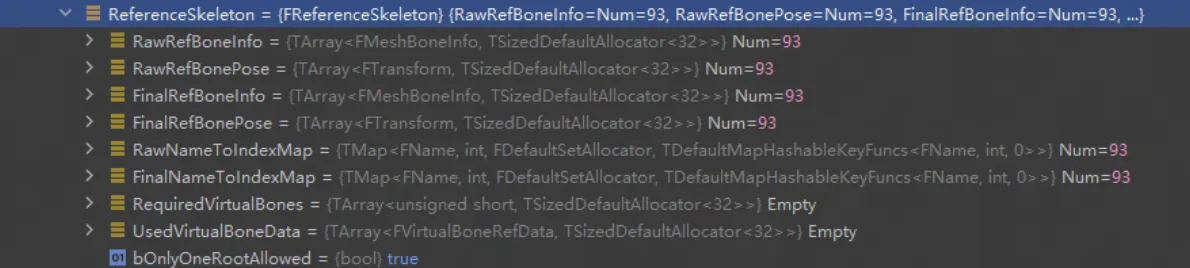
存储
- 原始的骨骼数据
- 加入了用户自定义virtual bone的全部骨骼数据
所有的骨骼用TArray静态存储树的结构,同时维护一个Name到Index的Map
struct FMeshBoneInfo{    FName Name;    int32 ParentIndex; // root的parentindex是NoneIndex(-1)}struct FReferenceSkeleton{// raw dataTArray<FMeshBoneInfo>  RawRefBoneInfo;TArray<FTransform>    RawRefBonePose;
// raw data + virtual bone dataTArray<FMeshBoneInfo>  FinalRefBoneInfo;TArray<FTransform>    FinalRefBonePose;
/** TMap to look up bone index from bone name. */TMap<FName, int32>    RawNameToIndexMap;TMap<FName, int32>    FinalNameToIndexMap;}
FSmartNameCnntainer
Section titled “FSmartNameCnntainer”可以自定义的属性,本身含有曲线属性

SkeletalMesh
Section titled “SkeletalMesh”class SkeletalMesh {// editor-onlyTSharedPtr<FSkeletalMeshModel> ImportedModel;
// runtime// 下面分析了FSkeletalMeshModel, TODO 分析SkeletalMeshRenderDataTUniquePtr<FSkeletalMeshRenderData> SkeletalMeshRenderData;
USkeleton* Skeleton;FBoxSphereBounds ImportedBounds;TArray<FSkeletalMaterial> Materials;UPhysicsAsset* PhysicsAsset;}classDiagramFSkeletalMesh *-- FSkeletalMeshModelFSkeletalMeshModel *-- FSkeletalMeshLODModelFSkeletalMeshLODModel *-- FSkelMeshSectionFSkelMeshSection *-- FSoftSkinVertex
FSkeletalMesh : TSharedPtr< FSkeletalMeshModel > ImportedModelFSkeletalMesh : USkeleton *
FSkeletalMeshModel : TArray < FSkeletalMeshLODModel> SectionsFSkeletalMeshLODModel: TArray < FSkelMeshSection > SectionsFSkelMeshSection : TArray< FSoftSkinVertex > SoftVertices
FSoftSkinVertex : FVector PositionFSoftSkinVertex : FVector TangentXFSoftSkinVertex : FVector TangentYFSoftSkinVertex : FVector TangentZFSoftSkinVertex : FVector2D UVsFSoftSkinVertex : FColor ColorSkeletal Mesh渲染的模式https://dev.epicgames.com/documentation/en-us/unreal-engine/skeletal-mesh-rendering-paths-in-unreal-engine
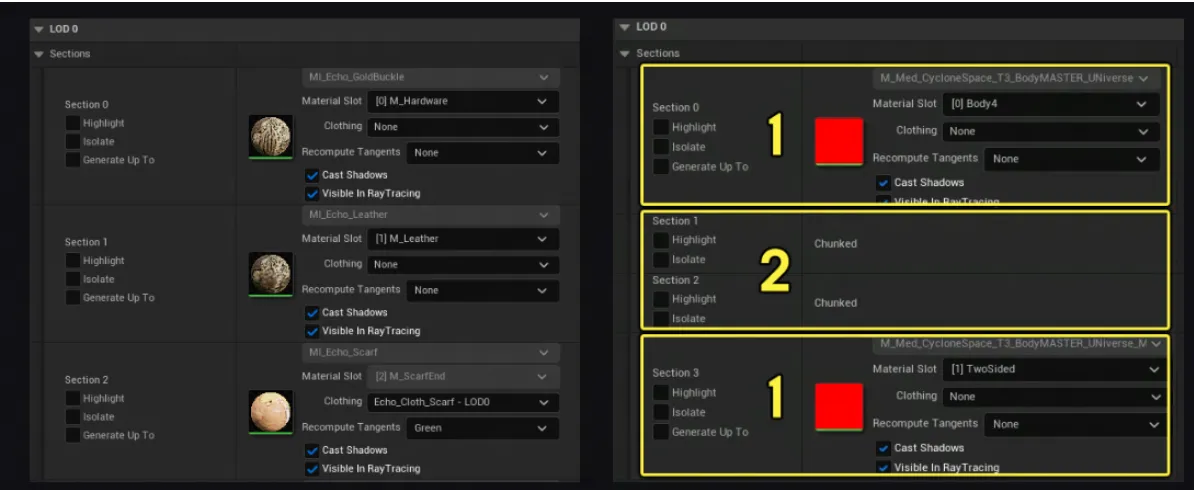
在某一个LOD层,同一Material的Mesh称为一个Section,如果一个Section依赖太多骨骼,会通过一些几何算法进一步拆分成多个Chunk。
Chunk只会在运行时生成,和Section共用同一个数据结构
class FSkeletalMeshModel{// TIndirectArray 和TArray差不多,但堆里面存储的是指向元素的指针,可以避免resize的时候memcopyTIndirectArray<FSkeletalMeshLODModel> LODModels;}


// FSkeletamMeshLODModel 对应某层LOD的skeletal mesh数据class FSkeletalMeshLODModel{  TArray<FSkelMeshSection> Sections;}
// SkelMeshSection// 这是使用同一material的子mesh// 也可能是Bone Chunking技术构造的子mesh,用于并行加速struct FSkelMeshSection{  int MaterialIndex;  int BaseIndex; // 相对于Sections首地址的偏移值  int BaseVertexIndex; // 顶点的offset  int NumTriangles;
  // 所有顶点的具体信息,包括Position,TBN向量, UV坐标, FColor  TArray<FSoftSkinVertex> SoftVertices;
  // 这一section用到的所有骨骼  TArray<FBoneIndexType> BoneMap;
  /*   * If this section was produce because of BONE chunking, the parent section index will be valid.   * If the section is not the result of skin vertex chunking, this value will be INDEX_NONE.   * Use this value to know if the section was BONE chunked:   * if(ChunkedParentSectionIndex != INDEX_NONE) will be true if the section is BONE chunked   */  int32 ChunkedParentSectionIndex;}
UAnimationSequence
Section titled “UAnimationSequence”UAnimSequenceBase中已经有了sequence所需要的核心数据和属性
class UAnimSequenceBase : public UAnimationAsset {    // 按时间先后排序    TArray<struct FAnimNotifyEvent> Notifies;
    float SequenceLength;    float RateScale;    bool bLoop;
    // sequecen数据,包括骨骼动画数据和curve,    // AnimSequence的instance会在运行时从DataModel中拿数据    TObjectPtr<UAnimDataModel> DataModel;}
class UAnimDataModel : public UObject, public IAnimationDataModel{    TArray<FBoneAnimationTrack> BoneAnimationTracks;    FFrameRate FrameRate; // 动画采样的帧率    int32 NumberOfFrames; // 采样总帧数    int32 NumberOfKeys; // 关键帧总数    FAnimationCurveData CurveData;//曲线数据}
// 一个track就对应一个bone的transform曲线struct FBoneAnimationTrack{    int32 BoneTreeIndex;    FName Name;
    /*    FRawAnimSequenceTrack:    TArray<FVector3f> PosKeys;    TArray<FQuat4f> RotKeys;    TArray<FVector3f> ScaleKeys;    */    FRawAnimSequenceTrack InternalTrackData;}
struct FAnimationCurveData{    TArray<FFloatCurve>  FloatCurves; // FFloatCurve 就是TArray保存的time/value(float)    TArray<FTransformCurve>  TransformCurves; // FTransformCurve 就是TArray保存的time/transform value(float3)}
UAnimSequence定义了些额外的的属性,如动画压缩、插值方式等
class UAnimSequence : public UAnimSequenceBase{// 动画压缩配置文件TObjectPtr<class UAnimBoneCompressionSettings> BoneCompressionSettings;TObjectPtr<class UAnimCurveCompressionSettings> CurveCompressionSettings;
// 被压缩后的数据,压缩的方法无非就是// 1. 线性插值造成的误差(这个误差一般是体现在mesh上的,比如绑两个点,计算替换前后这两个点的compnent space location)在一定threshold内的,只保留首位帧// 2. 对数据进行压缩,比如float扩大多少倍后压缩成int8/int16FCompressedAnimSequence CompressedData;
// Additive动画TEnumAsByte<enum EAdditiveAnimationType> AdditiveAnimType; // local space / mesh space
// RetargetingFName RetargetSource; //重定向的Base Pose
// 插值方式EAnimInterpolationType Interpolation; // linear / step(用更近的那个key的值)
// RootMotionbool bEnableRootMotion;}
UAnimInstance和FAnimInstanceProxy
Section titled “UAnimInstance和FAnimInstanceProxy”UAnimInstance是动画蓝图的父类,每个实例化的character拥有一个AnimInstance实例。通过AnimGraph封装动画流程,通过EventGraph或其他手段(比如BlueprintThreadsafeUpdate Function, 重写NativeThreadSafeUpdateAnimation等)和Actor的其他组件交互(比如移动组件)。
强依赖于FAnimInstanceProxy,FAnimInstanceProxy一般不止运行在工作线程。
struct UAnimInstance{    TObjectPtr<USkeleton> CurrentSkeleton;
    // 允许AnimInstance将native update, blend tree, montages 和 asset players 放到工作线程进行    // 需要同时设置Project Setting中的Allow Multi Threaded Animation Update"    uint8 bUseMultiThreadedAnimationUpdate : 1;
    FAnimInstanceProxy* AnimInstanceProxy}
帮助UAnimInstance实现动画系统的功能,主要是操作,管理动画节点,管理动画节点的各个虚函数调用,以及动画通知的处理,清理收集动画通知,然后把收集到的动画通知交给UAnimInstance去处理 FAnimInstanceProxy
// output pose nodeFAnimNode_Base* RootNode;
// linked instanceFAnimNode_LinkedInputPose* DefaultLinkedInstanceInputNode;
// 当前帧被触发的Anim NotifyTArray<FAnimNotifyEventReference> ActiveAnimNotifiesSinceLastTick;
// 在gamethread上执行的UAnimInstance::PreUpdateAnimation节点TArray<FAnimNode_Base*> GameThreadPreUpdateNodes;
FAnimNode_Base是动画节点的基类,在自定义节点的时候常常需要重写一些虚函数
class FAnimNode_Base{ ENGINE_API virtual void Initialize_AnyThread(const FAnimationInitializeContext& Context); ENGINE_API virtual void CacheBones_AnyThread(const FAnimationCacheBonesContext& Context); ENGINE_API virtual void Update_AnyThread(const FAnimationUpdateContext& Context); ENGINE_API virtual void Evaluate_AnyThread(FPoseContext& Output); ENGINE_API virtual void EvaluateComponentSpace_AnyThread(FComponentSpacePoseContext& Output);}动画蓝图的C++父类是AnimInstance,每一个Character将会拥有一个AnimInstance实例,从AnimInstance实例中也可以获取当前使用自己的Character,这样好处就是把动画相关的逻辑,拆分到AnimInstance去做了,使Character不会过于复杂庞大
动画蓝图(AnimInstanceProxy)中的所有节点以树状结构组织,它的第一个节点一定是FAnimNode_Root,初始化时将它赋值给RootNode。 RootNode虽然存放在数组中第一个,但却是动画蓝图的输出节点(Output Pose),其他节点都以输出逆序的方式通过FPoseLink(在蓝图编辑器中表现为有Pose连线)链接成一颗树,执行时采用前序递归遍历。 所有节点大致分为:
- 资源播放器(继承自FAnimNode_AssetPlayerBase),直接输出动画资源。
- 混合类节点(FAnimNode_.Blend.)负责确认具体的混合方式与动画结果。
- 动画状态和状态机。
- 其他功能节点。 对于所有节点来说,具体依赖的参数的计算在函数Update_AnyThread中确定(Time, Weight),依赖的DeltaTime和动画实例等参数在FAnimationUpdateContext中传递。然后在函数Evaluate_AnyThread中求解,结果保存在FPoseContext中,语义是到当前这个节点时,应该输出怎样的动画姿势、曲线、属性等。
总的来说,UE的动画系统是把所有操作都抽象成对Pose的处理,每个操作都是确定如何输出当前角色的Pose。
动画蓝图执行流程
Section titled “动画蓝图执行流程”总结 动画蓝图就是为了混合各个Pose,输出最终的Pose,最终的OutputPose是AnimGraph的Root,每次Tick,会先对EventGraph进行Tick,然后从Root开始DFS遍历两次AnimGraph Tree
- 执行每个Node的Update_AnyThread,通过传入父节点的FAnimUpdateContext,计算当前节点的weight【用于AnimationInsight、PoseWatch等】
- 执行每个Node的Evaluate_AnyThread, 父节点用子节点Pose更新自己的Pose,传递通过FPoseContext
以PSD为例,该Node接受一个输入Pose,对骨骼Transform进行后处理。根据读取的Config,找到Skeleton里的所有Driver Bone,每个Driver Bone对应一个PSD,每个PSD可以有多个DrivenBone,记录k个sample,每个sample包括DriverBone的Rot和DrivenBone的Transform。首先需要调用Solver计算出,当前Pose下(输入的Pose)每个Sample的权重,然后把每个DrivenBone的Transform更新为Sample的混合
void FAnimNode_XPoseDriver::Update_AnyThread(const FAnimationUpdateContext& Context){  Super::Update_AnyThread(Context);
  //EvaluateGraphExposedInputs.Execute(Context);
  InputPose.Update(Context);}
void FAnimNode_XPoseDriver::Evaluate_AnyThread(FPoseContext& Output){  FPoseContext dupContext(Output);  InputPose.Evaluate(dupContext);
  // Get the index of the source bone  const FBoneContainer& BoneContainer = dupContext.Pose.GetBoneContainer();
  DriverBoneTMs.Reset();  for (const FBoneReference& driverBone : DriverBones)  {    FTransform DriverBoneTM = FTransform::Identity;
    const FCompactPoseBoneIndex SourceCompactIndex = driverBone.GetCompactPoseIndex(BoneContainer);    if (SourceCompactIndex.GetInt() != INDEX_NONE)    {      DriverBoneTM = dupContext.Pose[SourceCompactIndex];      DriverBoneTMs.Add(driverBone.BoneName.ToString(), DriverBoneTM);    }  }
  //blend process  for (auto& elem : BoneToPSDTable)  {    auto boneName = elem.Key;    auto psdNames = elem.Value;
    auto& tm = DriverBoneTMs[boneName];
    for (auto& psdName : psdNames)    {      auto psd = PSDWorkers[psdName];      psd->Resolve(tm); // solver 解算
      auto currentPsdDescription = psd->_desc;      //blend driven joints TRS for skeleton psd.      if (currentPsdDescription.PsdSolverNodeType == "xSolver")      {        for (auto drivenBoneName : currentPsdDescription.DrivenObjects)        {          auto drivenBone = DrivenBones[drivenBoneName];
          FTransform DrivenBoneTM = FTransform::Identity;          const FCompactPoseBoneIndex SourceCompactIndex = drivenBone.GetCompactPoseIndex(BoneContainer);          if (SourceCompactIndex.GetInt() != INDEX_NONE)          {            DrivenBoneTM = dupContext.Pose[SourceCompactIndex];            FTransform& TargetTransform = Output.Pose[SourceCompactIndex];
            FVector lOriginalTranslate = DrivenBoneTM.GetTranslation();            FVector lOriginalAngle = DrivenBoneTM.GetRotation().Euler();            FQuat lOriginalQ = DrivenBoneTM.GetRotation();            FVector lOriginalScale = DrivenBoneTM.GetScale3D();
            //the number of weights must be same as the number of poses.            int weightsNum = psd->Weights.Num();            int posesNum = currentPsdDescription.Poses.Num();
            double lAllWeights = 0.0;
            FVector lT(0.0, 0.0, 0.0);            FVector lR(0.0, 0.0, 0.0);            FVector lS(1.0, 1.0, 1.0);
            std::string DebugWeights;            for (auto& elem2 : psd->Weights)            {              FString lPoseName = elem2.Key;              double lWeight = elem2.Value;
              auto lPose = currentPsdDescription.Poses.Find(lPoseName);

              auto lDrivenMatrix = lPose->outDrivenLocalMatrixList[drivenBoneName];              FMatrix& lMatrix = lDrivenMatrix;
              FTransform lDrivenTransform(lMatrix);              FVector translation = lDrivenTransform.GetTranslation();              FVector angles = lDrivenTransform.GetRotation().Euler();              FVector scale = lDrivenTransform.GetScale3D();
              lT.X += (translation.X * lWeight);              lT.Y += (translation.Y * lWeight);              lT.Z += (translation.Z * lWeight);
              lR.X += (angles.X * lWeight);              lR.Y += (angles.Y * lWeight);              lR.Z += (angles.Z * lWeight);

              lS.X *= ((scale.X - 1) * lWeight + 1);              lS.Y *= ((scale.Y - 1) * lWeight + 1);              lS.Z *= ((scale.Z - 1) * lWeight + 1);
              lAllWeights += lWeight;
            }
            //convert Maya translate to UE translate            TargetTransform.SetTranslation(FVector(lT.X, -lT.Y, lT.Z));

            double lRx = lR.X;            double lRy = lR.Y;            double lRz = lR.Z;

            auto lJointOrient = currentPsdDescription.DrivenJointOrientList[drivenBoneName];            double lOx = lJointOrient.X;            double lOy = lJointOrient.Y;            double lOz = lJointOrient.Z;
            auto A = FRotator(-lOy, -lOz, lOx);            auto B = FRotator(lR.Y, -lR.Z, lR.X);            FQuat jointOrientQ = FQuat(A);            FQuat jointRotateQ = FQuat(B);            FQuat lRotateQ =  jointOrientQ * jointRotateQ;

            if (!lRotateQ.IsNormalized())            {              lRotateQ.Normalize();            }
            TargetTransform.SetRotation(lRotateQ);            TargetTransform.SetScale3D(lS);          } // if SourceCompactIndex        } //for drivenBoneName      } // if xSolver    } // for psdName  } // for elem}
测试用例
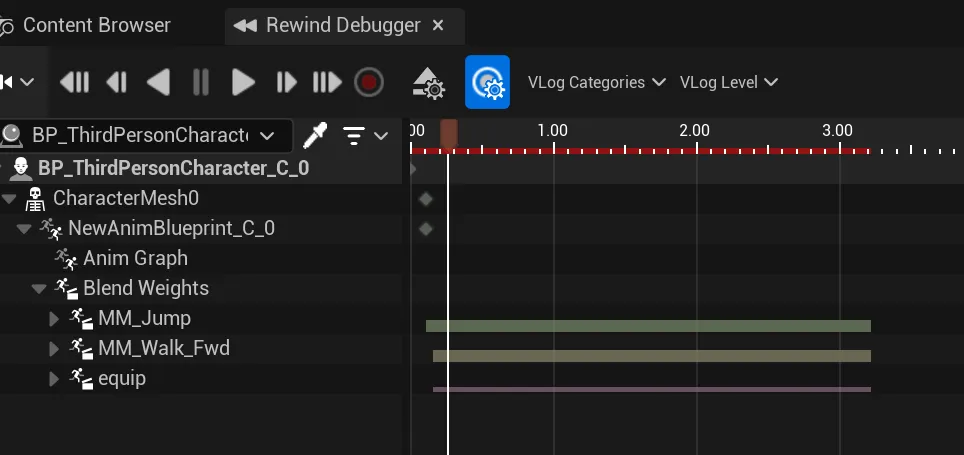
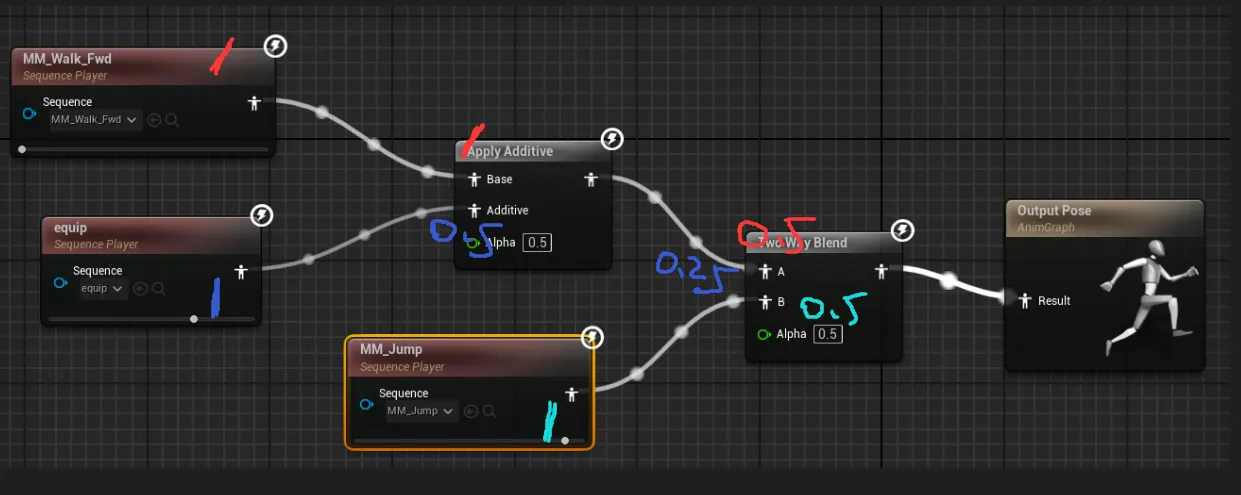
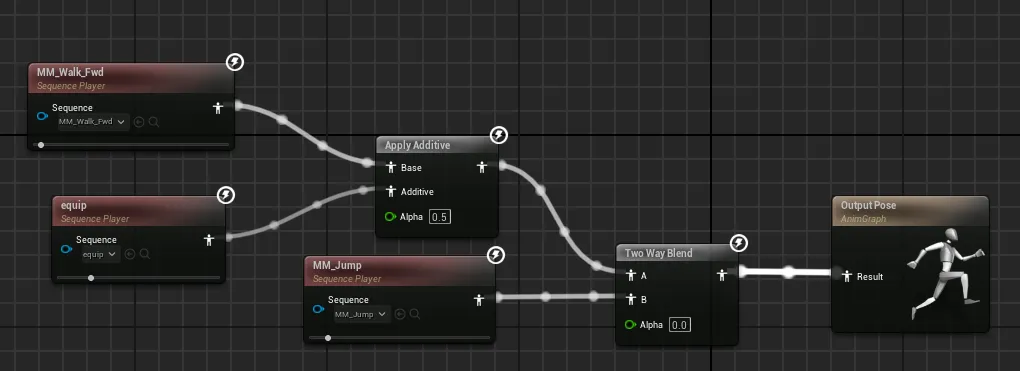
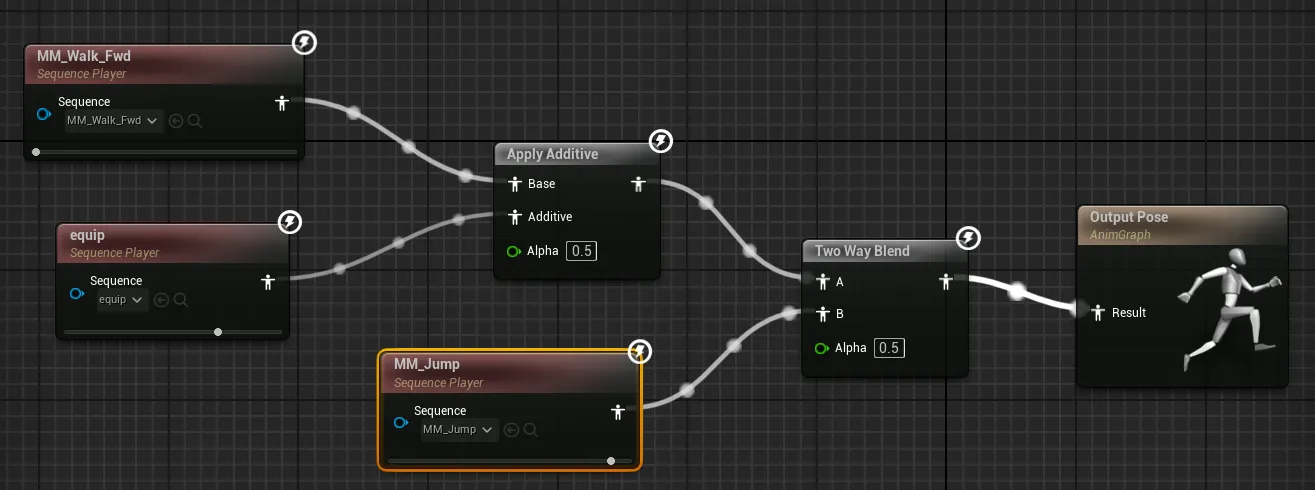 rewind中可以查看到三段sequence的blend比例分别为walk_fwd = 0.5,jump = 0.5,equip = 0.25
流程图
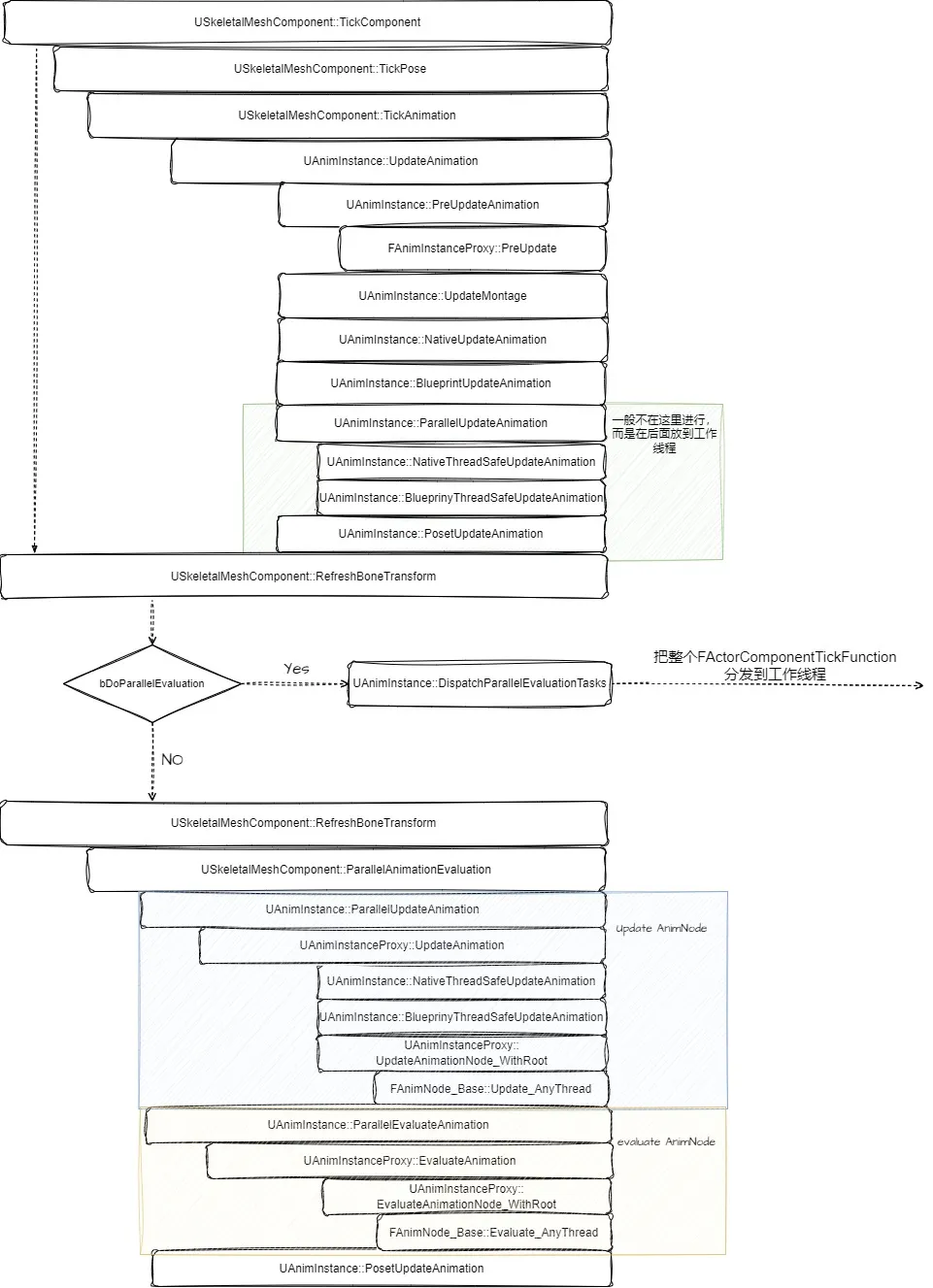 UAnimInstance::PreUpdateAnimation会调用FAnimInstanceProxy的函数
GetProxyOnGameThread<FAnimInstanceProxy>().PreUpdate(this, DeltaSeconds);,其中会执行
for (FAnimNode_Base* Node : GameThreadPreUpdateNodes){ Node->PreUpdate(InAnimInstance);}UAnimInstance::ParallelUpdateAnimation会调用GetProxyOnAnyThread<FAnimInstanceProxy>().UpdateAnimation();
注意绿框中的部分,在ABP预览状态时会执行,但在runtime一般不会执行,而是留到USkeletalMeshComponent::RefreshBoneTransform中,分发到工作线程执行。
FAnimInstanceProxy::ParallelUpdate是动画AnimGraph执行的核心部分
void FAnimInstanceProxy::UpdateAnimation(){    // 首先对root(outputpose)执行    UpdateAnimation_WithRoot(Context, RootNode, NAME_AnimGraph);
// 线程安全更新函数(native和蓝图中定义的) // UAnimInstance::NativeThreadSafeUpdateAnimation一般会在自己继承AnimInstance的cpp类中overwrite NativeThreadSafeUpdateAnimation(); BlueprintThreadSafeUpdateAnimation();}FAnimNode_Base::Update_AnyThread会从root进去遍历每个node执行,通过FPoseLinkBase找到链接到当前node的子节点(树的子节点,其实是animgraph的上游节点)。具体实现在FPoseLinkBase::Update中
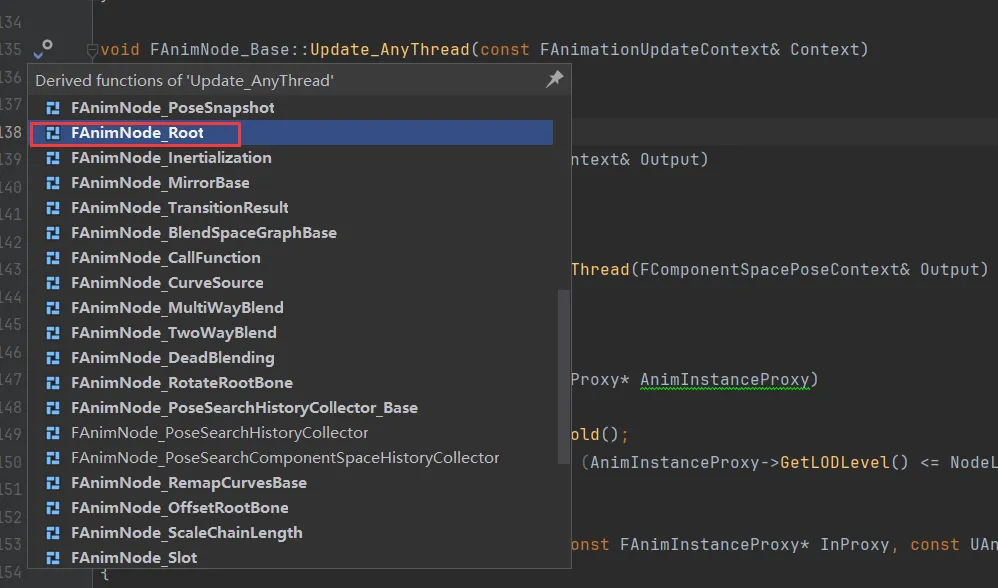
然后Evaluate_AnyThread也是类似的操作。
分发到工作线程的方式
Section titled “分发到工作线程的方式”举例几个AnimNode
Section titled “举例几个AnimNode”FAnimNode_TwoBoneIK
Section titled “FAnimNode_TwoBoneIK”FAnimNode_SequencePlayer
Section titled “FAnimNode_SequencePlayer”自定义 FAnimNode_PSD
Section titled “自定义 FAnimNode_PSD”Fast Path
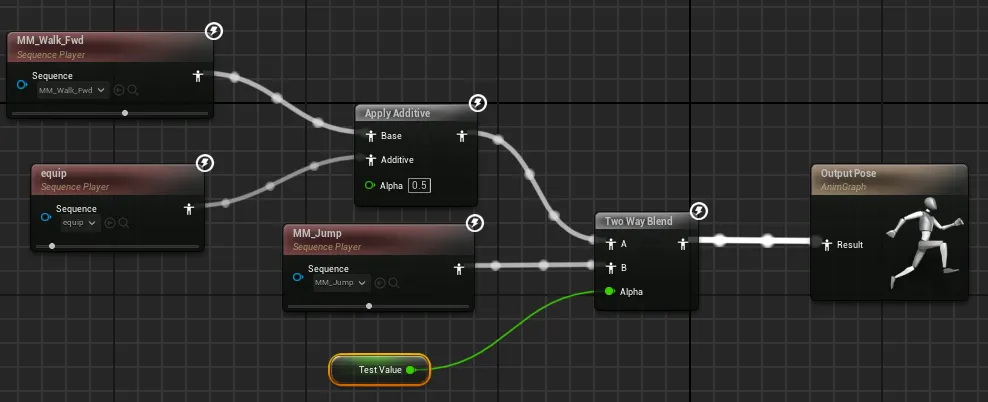
Section titled “Fast Path”下图中1、2均支持Fast Path, 官方文档写着:读成员变量、对结构体成员变量进行break操作以及Bool Not操作依然支持Fast Path,而其他数值运算不支持Fast Path(图三)。
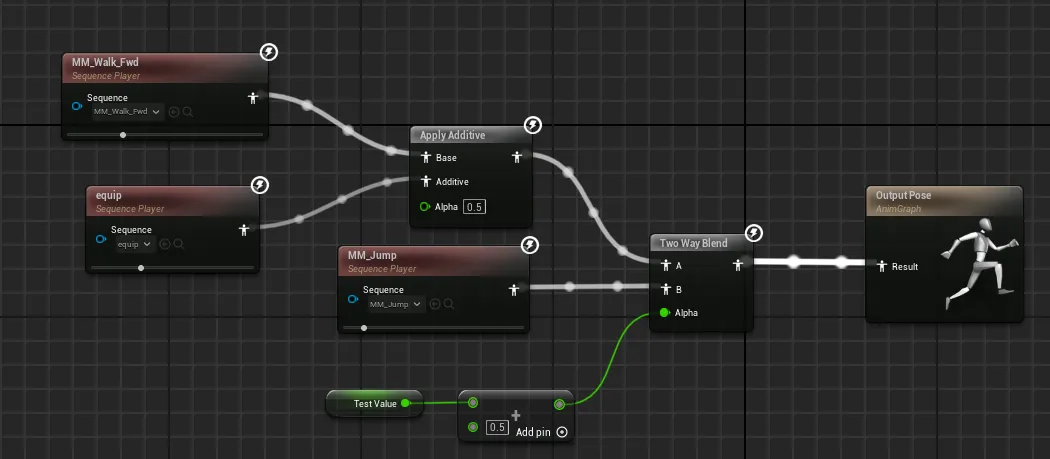
什么是Fast Path
使用FastPath,引擎就可以在内部复制参数,而不是执行蓝图代码,后者需要调用蓝图虚拟机在runtime对编译的蓝图字节码进行解释,测速验证结果如下。
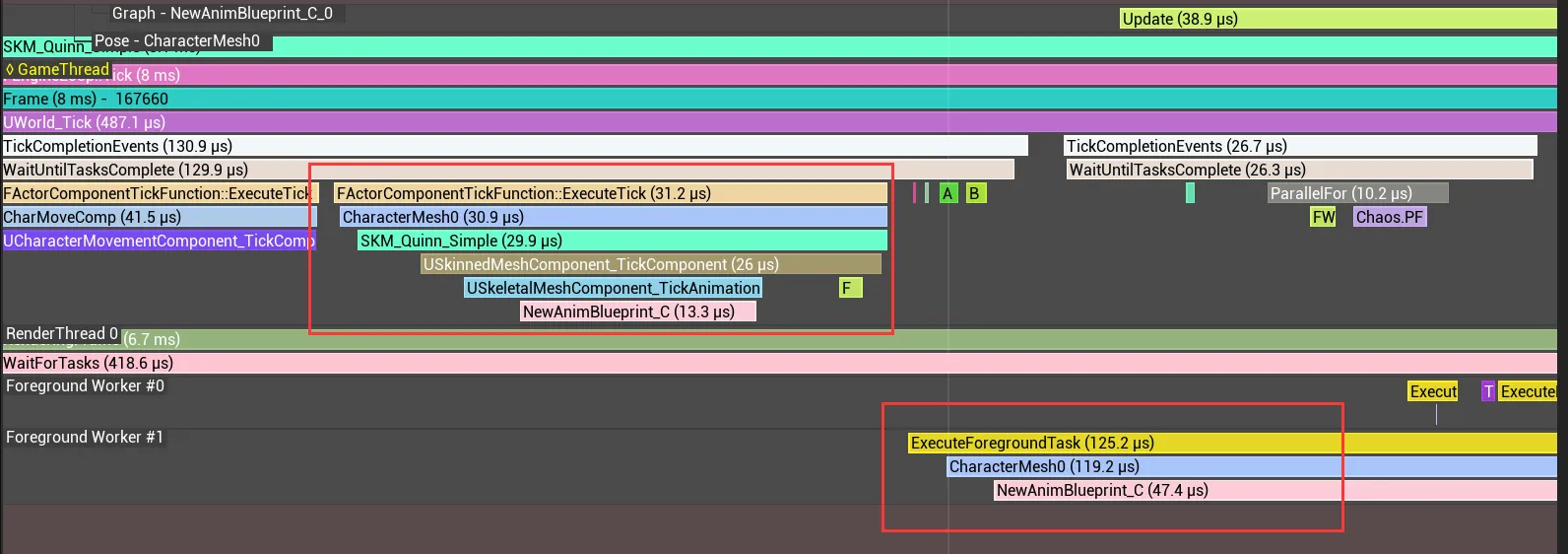
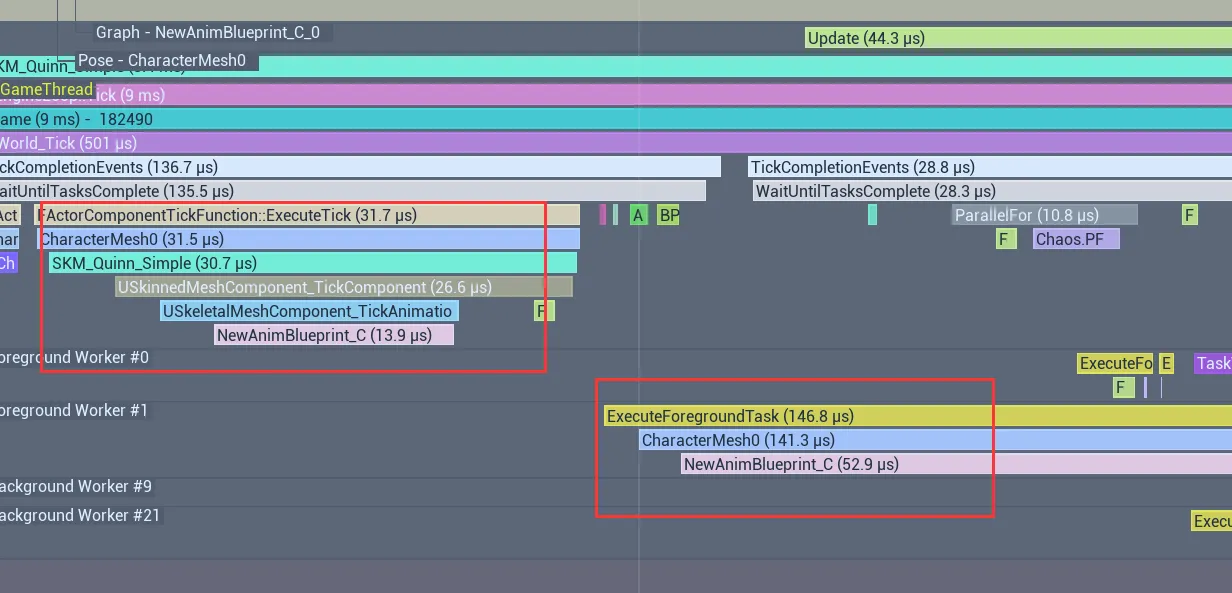
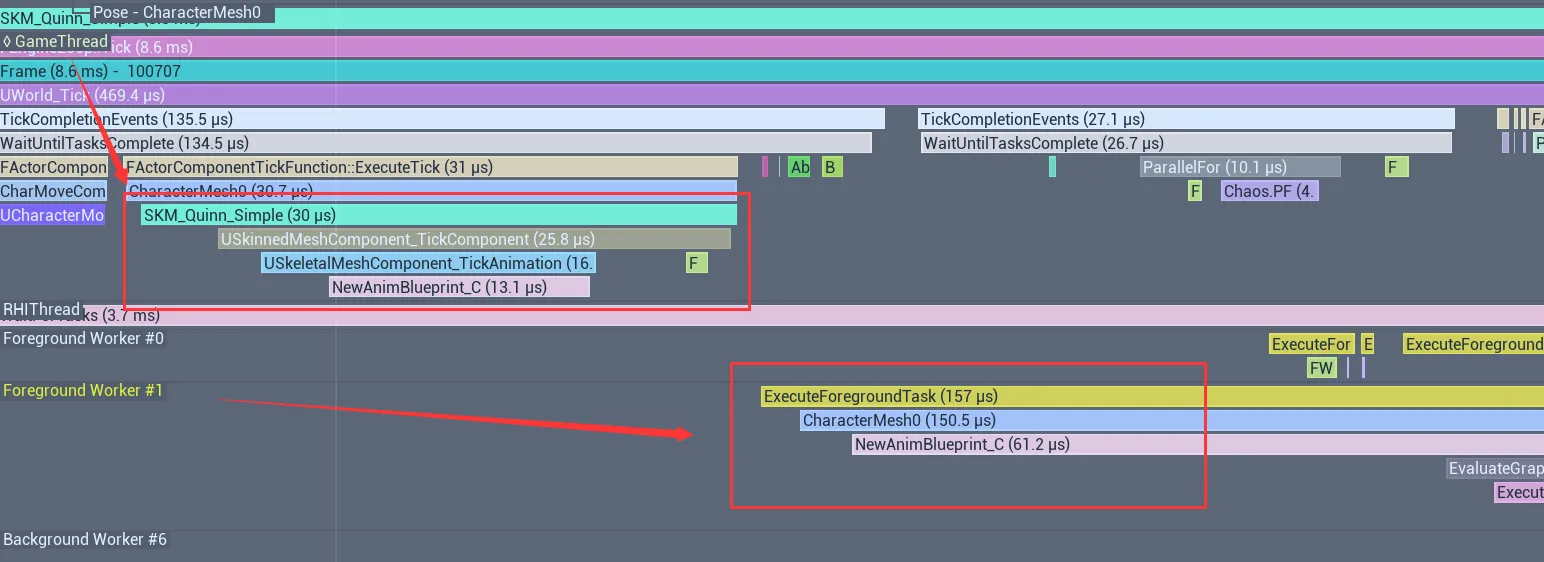
- graph-1 13 + 47
- graph-2 13 + 52
- graph-3 13 + 61