tiny-physic-engine
Before Reading
Section titled “Before Reading”本项目只作为课程作业。项目地址
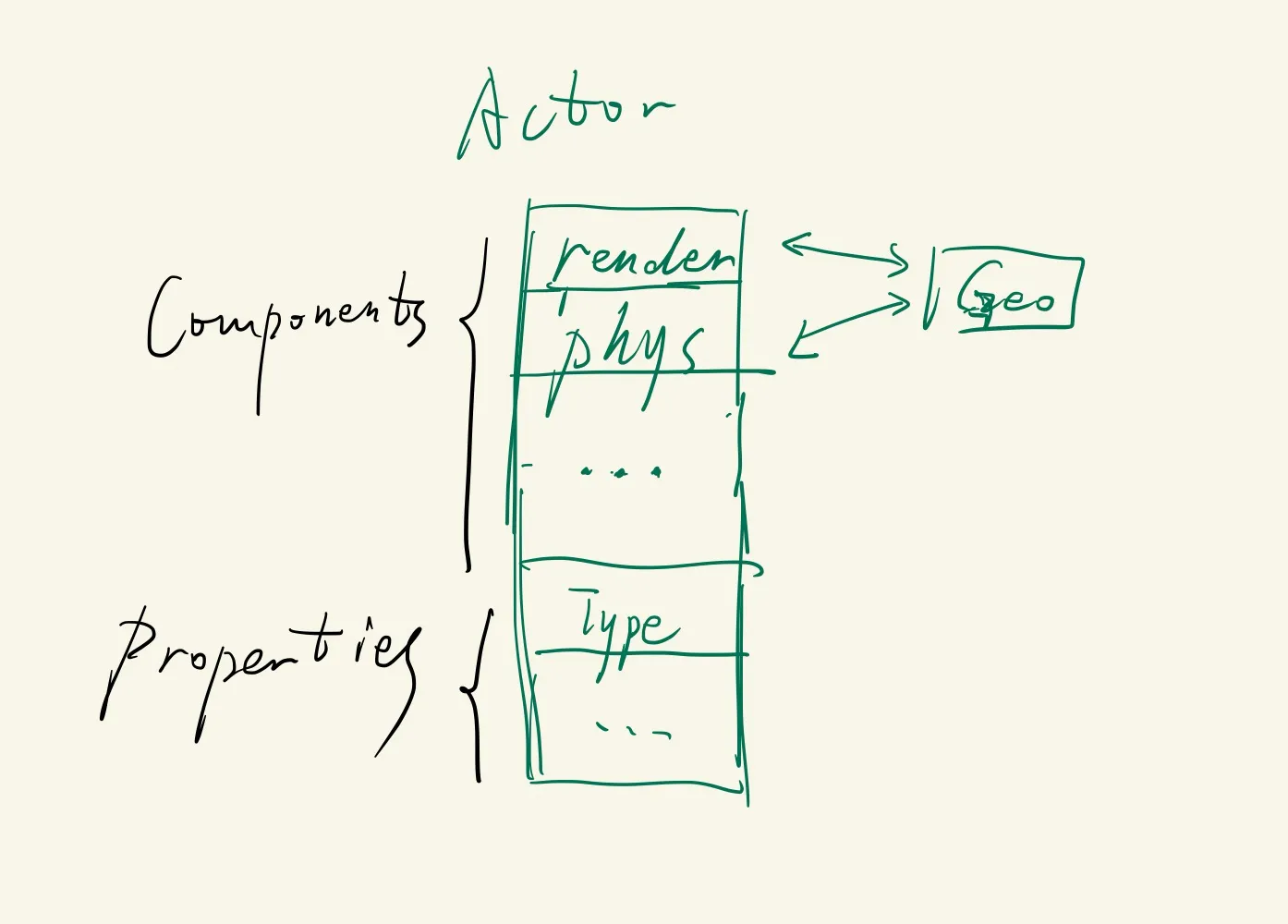
几何模块为公共的几何体,如line、circle、AABB、triangle、mesh等,并有相应的几何变换和空间加速方法。
物理和渲染模块都继承几何模块的类,物理模块可能有额外的质量、速度、形变梯度等数据,渲染模块有额外的三角形剖分、shader、VAO等数据
使用观察者模式和std::function实现,物理模块对Geometry产生更新时通知渲染模块进行动态渲染。
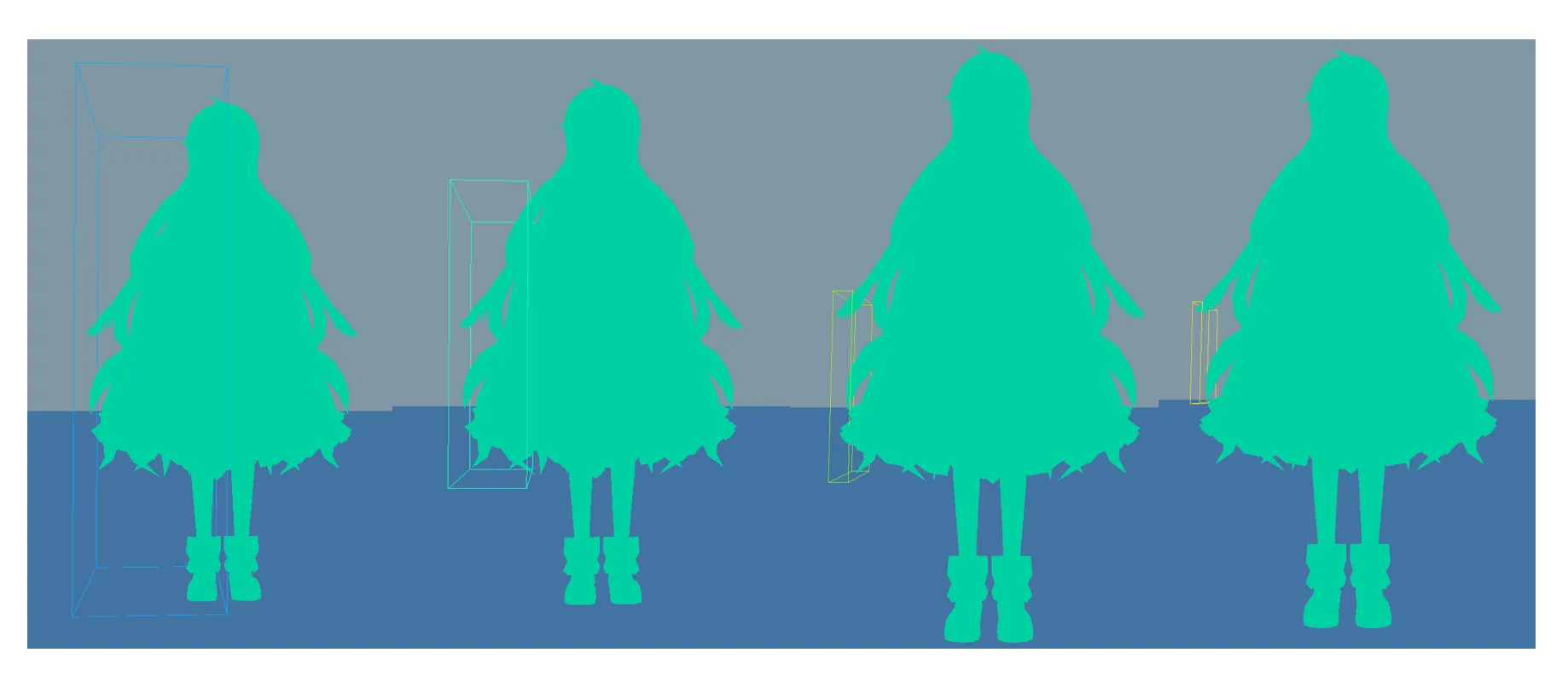
从距离的中点去划分,存在死循环的问题,当一个节点的兄弟节点为空时,就需要递归返回了,否则一个AABB中有n个三角形,划分后变为0 + n, 继续还是0 + n
std::pair<BVHNode*, BVHNode*> SplitBVHNode(BVHNode* node){        // x-alias partition        auto bound = node->bound;        std::vector<Triangle*> leftTriangles, rightTriangles;        leftTriangles.reserve(node->triangles.size());        rightTriangles.reserve(node->triangles.size());        for(const auto& tri : node->triangles){            if(GetMax(GetBound(*tri)).x < bound.position.x){                leftTriangles.push_back(tri);            }else{                rightTriangles.push_back(tri);            }        }        auto left = new BVHNode(GetBound(leftTriangles), std::move(leftTriangles));        auto right = new BVHNode(GetBound(rightTriangles), std::move(rightTriangles));        return {left, right};    }
    void RecursiveBuildBVH(BVHNode* node, int kThreshold) {        // Boundary Condition        if(node->triangles.size() < kThreshold){            return;        }//        if(BVH_DEPTH > MAX_DEPTH) return;
        PHY_DEBUG("Node bound pos: {}, halfSize: {}, triNum:{}", node->bound.position, node->bound.halfSize, node->triangles.size());

        // Split        auto [leftNode, rightNode] = SplitBVHNode(node);
        if(!leftNode->triangles.empty() || !rightNode->triangles.empty()){            std::vector<Triangle*>().swap(node->triangles);        }
        bool shouldReturn = false;        if(!leftNode->triangles.empty()){            node->left = leftNode;        }else{            shouldReturn = true;        }
        if(!rightNode->triangles.empty()){            node->right = rightNode;        }else{            shouldReturn = true;        }        if(shouldReturn) return;
        // Recursive        BVH_DEPTH++;        RecursiveBuildBVH(node->left, kThreshold);        BVH_DEPTH--;
        BVH_DEPTH++;        RecursiveBuildBVH(node->right, kThreshold);        BVH_DEPTH--;    }
只从x方向取中点去划分也会导致AABB越来越细长
CMakeLists.txt
Section titled “CMakeLists.txt”if(APPLE)# OPENGL find_package(OpenGL REQUIRED)
# GLFW find_package(glfw3 REQUIRED)
target_link_libraries(Renderer PUBLIC OpenGL::GL glfw)这样就可以了,因为CMake会尝试查找名为FindOpenGL.cmake的模块文件。在本地mac中路径为
~/brew-2.2.2/Cellar/cmake/3.23.2/share/cmake/Modules
里面会设定一些库的名称,比如OpenGL::GL可以直接链接
31 ``OpenGL::GL`` 32 Defined to the platform-specific OpenGL libraries if the system has OpenGL . 33 ``OpenGL::GLU`` 34 Defined if the system has OpenGL Utility Library (GLU). 35 36 .. versionadded:: 3.10 37 Additionally, the following GLVND-specific library targets are defined: 38 39 ``OpenGL::OpenGL`` 40 Defined to libOpenGL if the system is GLVND-based. 41 ``OpenGL::GLX`` 42 Defined if the system has OpenGL Extension to the X Window System (GLX). 43 ``OpenGL::EGL`` 44 Defined if the system has EGL.VAO VBO EBO
Section titled “VAO VBO EBO”1 VAO <==> 1 VBO, 1 VEO 用一个GLVertexArray类
将一个GLVertexArray对象绑定一个物体,场景中可以加入多个物体,每个物体负责自己的GLVertexArray的GenBuffer、BufferData、Bind、UnBind
渲染的一个流程大概是:
- 设置渲染参数(比如深度测试、混合测试等)
- 设置MVP矩阵
- ==设置material(包括各种texture)【可以通过工厂模式,读取json】==(SetMaterial)
- 渲染第一帧
- ==mesh ==> [vertices data, indices data]==(GetVerticesBuffer)
- // 以下4个放在一个函数里(SetPipelineData)
- ==生成 VAO, VBO, EBO==
- ==vertices data ==> VBO==
- ==indices data ==> EBO==
- ==设置VAO的vertex attribute pointer, 并enable==
- draw
- RenderLoop
- Update mesh【物理运动】
- 渲染一帧
- ==mesh ==> [vertices data, indices data]==(GetVerticesBuffer)
- ==更新texture, material(可能需要, 只需要更新material,而不用更新shader)==(SetMaterial)
- // 以下4个放在一个函数里(SetPipelineData)
- ==生成 VAO, VBO, EBO==
- ==vertices data ==> VBO==
- ==indices data ==> EBO==
- ==设置VAO的vertex attribute pointer, 并enable==
- draw
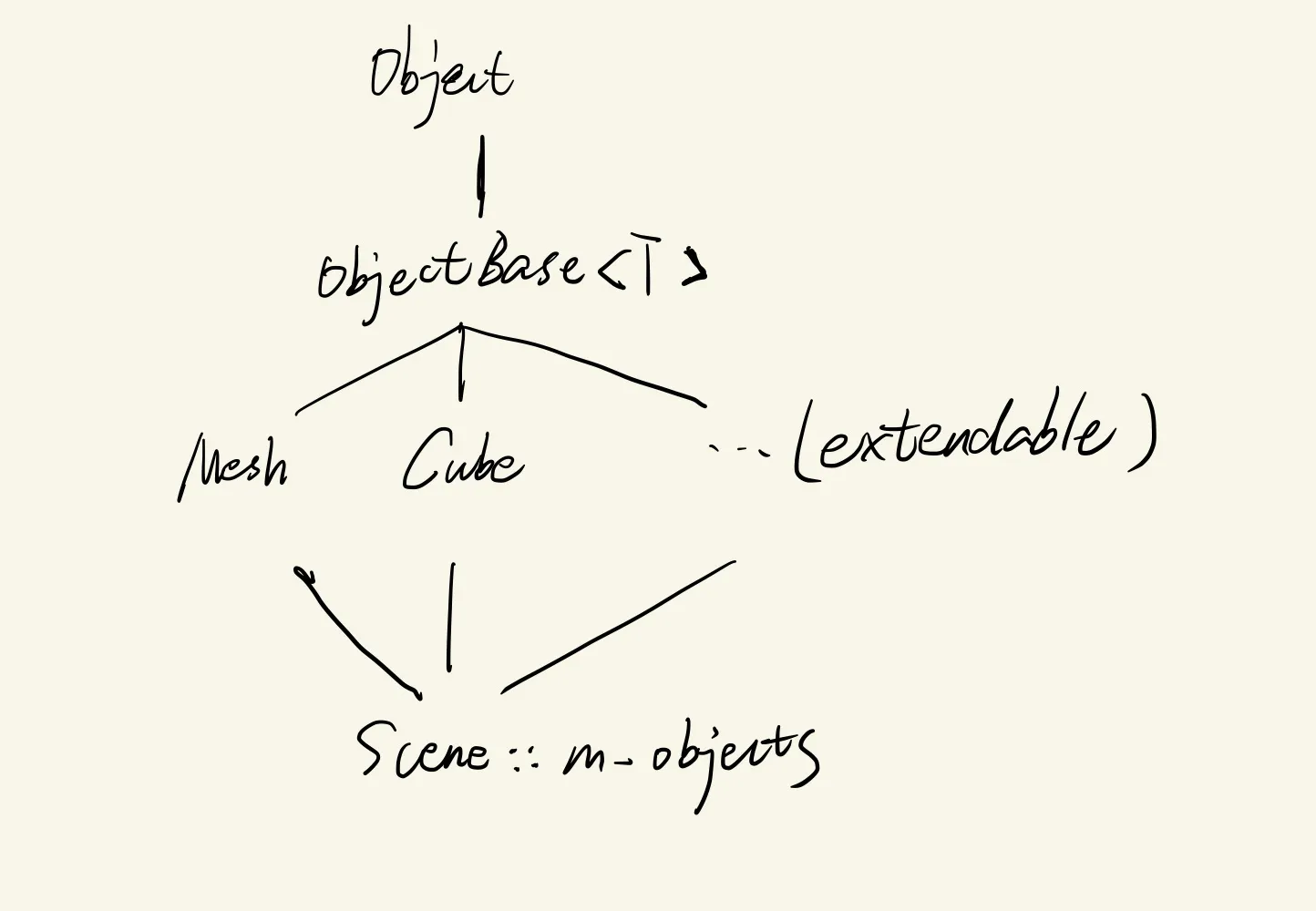
黄色部分写在ObjectBase里, ObjectBase被各种物体继承,比如Mesh, Cube等。
额外套一层Object是为了Scene里可以用std::vector<std::shared_ptr<Object>> m_objects 来实现多态
class Object{    public:        virtual ~Object() = default;        virtual void SetPipelineData() = 0;        virtual void GetVerticesBuffer() = 0;        virtual void SetMaterial() = 0;    };
template<typename VertexType>class ObjectBase : public Object {  public:  virtual void SetPipelineData() = 0; // Setup VAO, VBO, VEO  virtual void GetVerticesBuffer() = 0; // Get vertices and indices  virtual void SetMaterial() = 0; // Set shader/material parameter/texture
  public:  std::vector<VertexType> m_vertices;  std::vector<unsigned int> m_indices;  Shader *m_shader;  GLVertexArray m_VAO{};};
VertexType用来制定某个物体在渲染管线上,一个节点的格式,在ObjectBase的继承类中设置,方便拓展,比如
struct MeshVertex{        vec3 position;        vec3 normal;        vec2 coord;    };
    class Mesh : public ObjectBase<MeshVertex>{    public:        ~Mesh() override;        void SetPipelineData() override;        void GetVerticesBuffer() override;        void SetMaterial() override;
    private:        std::shared_ptr<geo::Mesh> GeoMesh;    };
虽然我们知道,一个模型,比如*.obj可能由很多个mesh组成,但我们将这种模型抽象为geo::mesh,在geometry中处理变换、缩放等操作,传输给renderer::mesh送上渲染管线。
Physic模块
Section titled “Physic模块”implicit solver
Section titled “implicit solver”注意 下图中的x[0] , v[0]表示第0时刻, x(0)表示newton的初始值
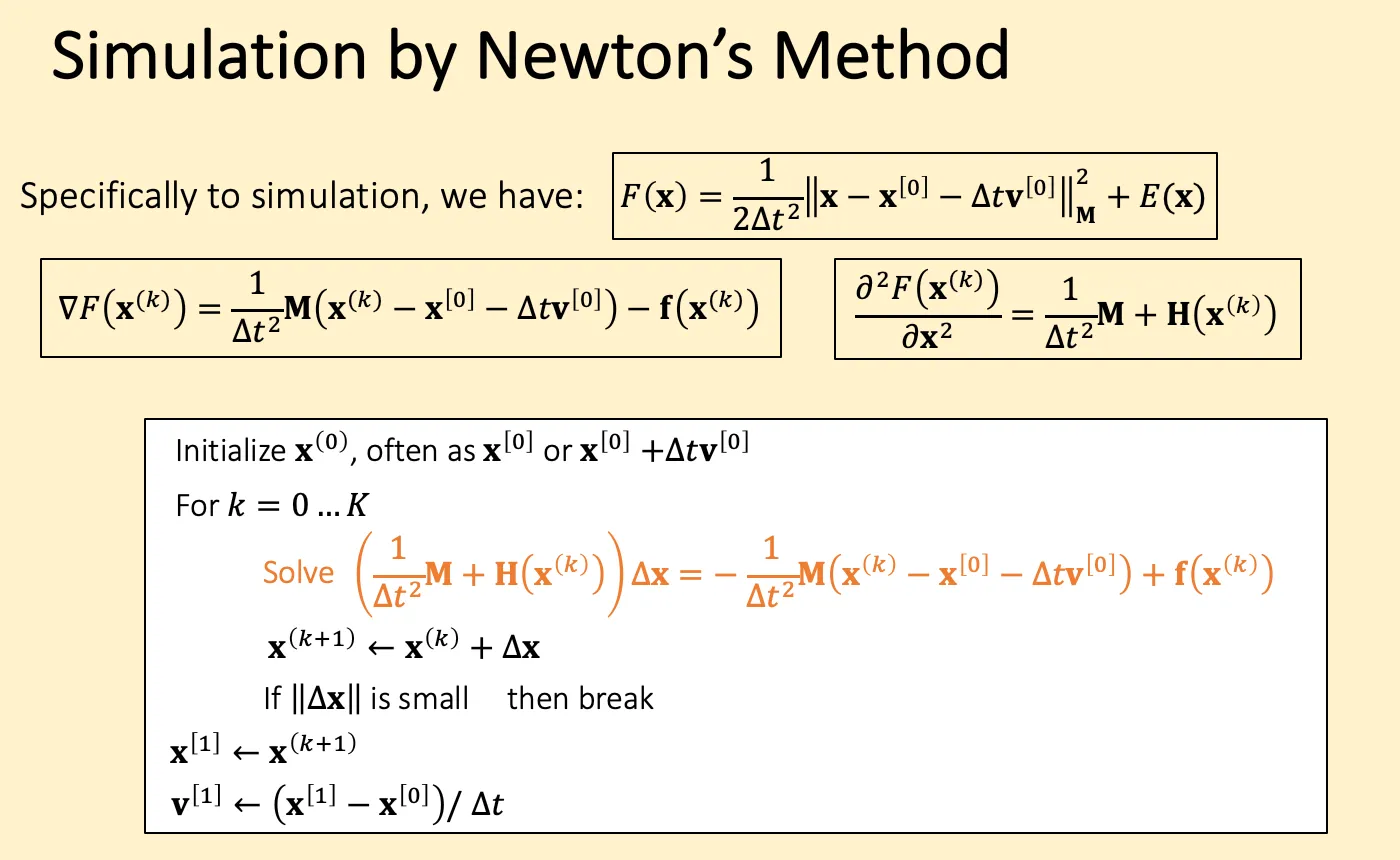
准确的Solve dx应该采用线性系统的解算器,比如jacobi、pcg等,这里用近似, g是一介导, hessian近似位一个对角阵,k是弹簧的K
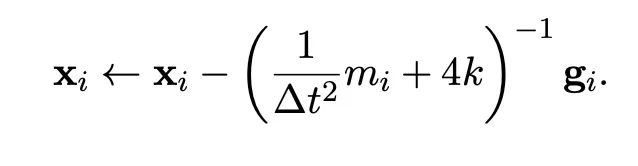
两种初始化区别不大,在设定最大迭代次数位32时,前者为40ms/substep,后者为50ms/substep
优化过程
- 最开始40ms
std::string_view
Section titled “std::string_view”c++17
std::string s = "123456"; // 会把 c string 常量深拷贝给sstd::string_view s = "123456"; //只包括首位两个指针, 不会拷贝,但read-only关于Model
Section titled “关于Model”以.obj为例,正常的obj file中,vertex是不会重复的,所以vertices.size() < indices.size()
但在load之后,主流的loader(比如assimp的默认参数和tinyobjloader)会把vertex重复来实现两个面的公共顶点具有不同的normal,所以vertices.size() == indices.size()
而我在渲染模块中采取了重复定点的方案,在物理模块使用了不重复的方案(后续优化),所以写了相互转化的函数。
- 不重复 ==> 重复, 这里转成 vector<Triangle*>
auto& triVec = m_model->m_meshes[0].triangles; triVec.clear(); triVec.reserve(m_indices.size() / 3); for(int i = 0; i < m_indices.size(); i += 3){ auto tri = new geo::Triangle( m_vertices[m_indices[i]], m_vertices[m_indices[i + 1]], m_vertices[m_indices[i + 2]] ); triVec.push_back(tri);- 重复 ==> 不重复
struct Vec3Hash {    size_t operator()(const vec3& v) const {        size_t seed = 0;        std::hash<float> hasher;        seed ^= hasher(v.x) + 0x9e3779b9 + (seed << 6) + (seed >> 2);        seed ^= hasher(v.y) + 0x9e3779b9 + (seed << 6) + (seed >> 2);        seed ^= hasher(v.z) + 0x9e3779b9 + (seed << 6) + (seed >> 2);        return seed;    }};
std::unordered_map<vec3, int, Vec3Hash> vertexMap;std::vector<vec3> uniqueVertices;uniqueVertices.reserve(m_vertices.size());
// 注意要遍历facefor (int i = 0; i < m_indices.size(); i++) {  auto vertIdx = m_indices[i];  auto it = vertexMap.find(m_vertices[vertIdx]);  if (it == vertexMap.end()) {    int newIndex = static_cast<int>(uniqueVertices.size());    vertexMap[m_vertices[vertIdx]] = newIndex;    uniqueVertices.push_back(m_vertices[vertIdx]);    m_indices[i] = newIndex;  } else {    m_indices[i] = vertexMap[m_vertices[vertIdx]];  }}uniqueVertices.shrink_to_fit();m_vertices = std::move(uniqueVertices);PHY_INFO("after deduplicate: {} vertices, {} indices",         m_vertices.size(), m_indices.size());
拼接mesh
for (const auto &mesh: m_model->m_meshes) { m_indices.reserve(m_indices.size() + mesh.indices.size()); auto tempSize = m_vertices.size(); // 易错 for(int i = 0; i < mesh.indices.size(); i++){ m_indices.push_back(mesh.indices[i] + tempSize); } m_vertices.reserve(m_vertices.size() + mesh.vertices.size()); m_vertices.insert(m_vertices.end(), mesh.vertices.begin(), mesh.vertices.end()); }switch case
Section titled “switch case”原理是跳转到相应的case往下执行,所以必须加break
switch(x):case a: break;case b: break;IMGUI 与 renderer层级
Section titled “IMGUI 与 renderer层级”IMGUI面板在顶层,所以放在后面
///////////// physicsm_physics->Update(dt);
///////////// rendererm_camera.Update(dt);m_renderer.Update(m_camera);auto renderList = m_scene->GetObjects();m_renderer.Render(m_camera, renderList.cbegin(), renderList.cend());

//////////// Guim_gui->Draw(m_window.m_window);
鼠标在IMGUI面板上时禁用摄像头转动
Section titled “鼠标在IMGUI面板上时禁用摄像头转动”在gui类里include Input.h, Input类中声明bool m_mouseClickEnabled, 同时监听鼠标与面板的关系,对m_mouseClickEnabled进行修改,MouseClicked监听事件加入判断
std::function<void(int, int, int)> mouseClicked = [&](auto button, auto action, auto mode){ if(m_mouseClickEnabled && button >= 0 && button < 128){ switch (action){ case GLFW_PRESS: // PHY_INFO("press"); m_buttons[button] = true; break; case GLFW_RELEASE: m_buttons[button] = false; // PHY_INFO("release"); break; } }};gui类内
if (ImGui::IsWindowHovered()) { // Disable mouse actions by capturing mouse input events// ImGui::CaptureMouseFromApp(true); Input::GetInstance().disableMouse(); // Optionally, you can also disable keyboard input events // ImGui::CaptureKeyboardFromApp(true); }else{ // Release mouse input events when the mouse is not hovering// ImGui::CaptureMouseFromApp(false); Input::GetInstance().enableMouse(); // Optionally, release keyboard input events // ImGui::CaptureKeyboardFromApp(false); }全局变量 static / extern
Section titled “全局变量 static / extern”编译单元就是一个cpp,并且展开里面所有的#include
static 定义本编译单元的全局变量
Section titled “static 定义本编译单元的全局变量”static int x;
// A.cpp (A 编译单元)#include <Base.h>x = 1; // A_x
// B.cpp (B编译单元)#include <Base.h>x = 2; // B_x
// A_x和B_x存在两个不同的地址 是不一样的extern 声明本编译单元或其他编译单元的全局变量
Section titled “extern 声明本编译单元或其他编译单元的全局变量”首先是定义和声明的区别
int x; // 定义 未初始化int y = 1; // 定义 并初始化extern int x; // 声明extern int x = 0; // 定义,能编译但一般不这么用这里的全局,只能用于相互链接的某一个或几个库(STATIC, SHARED都可以)、或executable
相互链接是通过target_link_libraries(lib_a PUBLIC lib_b)
在打包某一个库时,必须保证他用到的全局变量在[这个库或他链接的库内部]定义
add_library(render A.cpp B.cpp C.cpp)
add_library(physic D.cpp)target_link_libraries(physic render)  // physics只能用render,physics里定义的全局变量  // 而render并不能用physics里定义的全局变量

add_executable(main main.cpp)target_link_libraries(main render physic)  // main只能用render,physics里定义的全局变量  // 而render,physics并不能用main里定义的全局变量
// case 0add_executable(main A.cpp B.cpp C.cpp)
// case 1// D.cpp查找不到A.cpp中定义的全局变量// Undefined symbols// 因为physic和render是两个独立的库,所以互相查不到 可以通过target_link_libraries(physic render)解决add_library(render A.cpp B.cpp C.cpp)add_library(physic D.cpp)add_executable(main main.cpp)target_link_libraries(main render physic)
// case 2// 可以的 因为main链接了render库add_library(render A.cpp B.cpp C.cpp)add_executable(main main.cpp)target_link_libraries(main render)在某一个模块里定义一个全局变量,在本模块或其他模块使用这个全局变量需要声明
- 必须在cpp中定义全局变量,否则可能会redefinition error
int x; // 注意这是定义,只是没有初始化void f(){  x = 5;}
// B.cppextern int x; // 加了extern表示声明x = 6;
// C.cppextern int x; // 加了extern表示声明std::cout << x;- 在header中声明,用于简化
int x; // 注意这是定义,只是没有初始化void f(){  x = 5;}
// Base.hextern int x;// 加了extern表示声明
// B.cpp#include <Base.h>x = 6;
// C.cpp#include <Base.h>std::cout << x;- 在header中定义的话
////// 正确extern int x; // 声明 在本模块或其他模块存在x的定义
// A.cpp#include "A.h"int x = 5;int main(){    std::cout << x;}

////// 错误 redifinition// A.hextern int x = 0; // 这是定义
// A.cppint x = 5;int main(){ std::cout << x;}在demo里定义全局变量,控制imgui事件对渲染、仿真结果做出改变
// 定义只在demo.cpp会用到的变量namespace control{    static geo::BVHNode* currNode;    static vec3 ground_color = {0.2, 0.4, 0.6};    static vec3 ground_pos = vec3(0, -1.2, 0);    static vec3 ground_halfSize = vec3(100, 1.2, 100);    static int show_level = 10;}
// 声明需要去外部找的变量namespace control{    extern vec4 clear_color;    extern geo::BVHSplitStrategy bvh_strategy;}void f(){control::clear_color ....}
// RenderSystem.cpp// 声明需要去外部找的变量namespace control{    extern vec4 clear_color;}void f(){control::clear_color ....}
// GuiSystem.cpp// 定义全局变量namespace control{    vec4 clear_color = vec4(0.45f, 0.55f, 0.60f, 1.00f);}

// 包含关系add_library(Gui GuiSystem.cpp)
add_library(RenderSystem RenderSystem.cpp)target_link_libraries(RenderSystem Gui)
add_executable(demo demo.cpp)target_link_libraries(demo RenderSystem Gui)Derived类的第一个虚函数必须定义,只声明不定义会报错
Undefined symbols for architecture x86_64: "vtable for Cloth", referenced from: ActorBase<geo::Model>::InitPhysicsObject() in BVHTest.cpp.o NOTE: a missing vtable usually means the first non-inline virtual member function has no definition.虚函数的默认参数不会被继承,通过什么类型的指针调用,就会用对应的默认参数
opengl
Section titled “opengl”glDrawElement 如果画的是三角形primitive,并且ebo出现 (1,1,0)这样重复的顶点会报错
Texture uv坐标
Section titled “Texture uv坐标”stb_image读取的图片和opengl渲染管线读入的 y坐标要返转一下
m_coord[i] = vec2(vertices[i].TextureCoordinate.X, 1- vertices[i].TextureCoordinate.Y);